Quick Summary & Key Takeaways
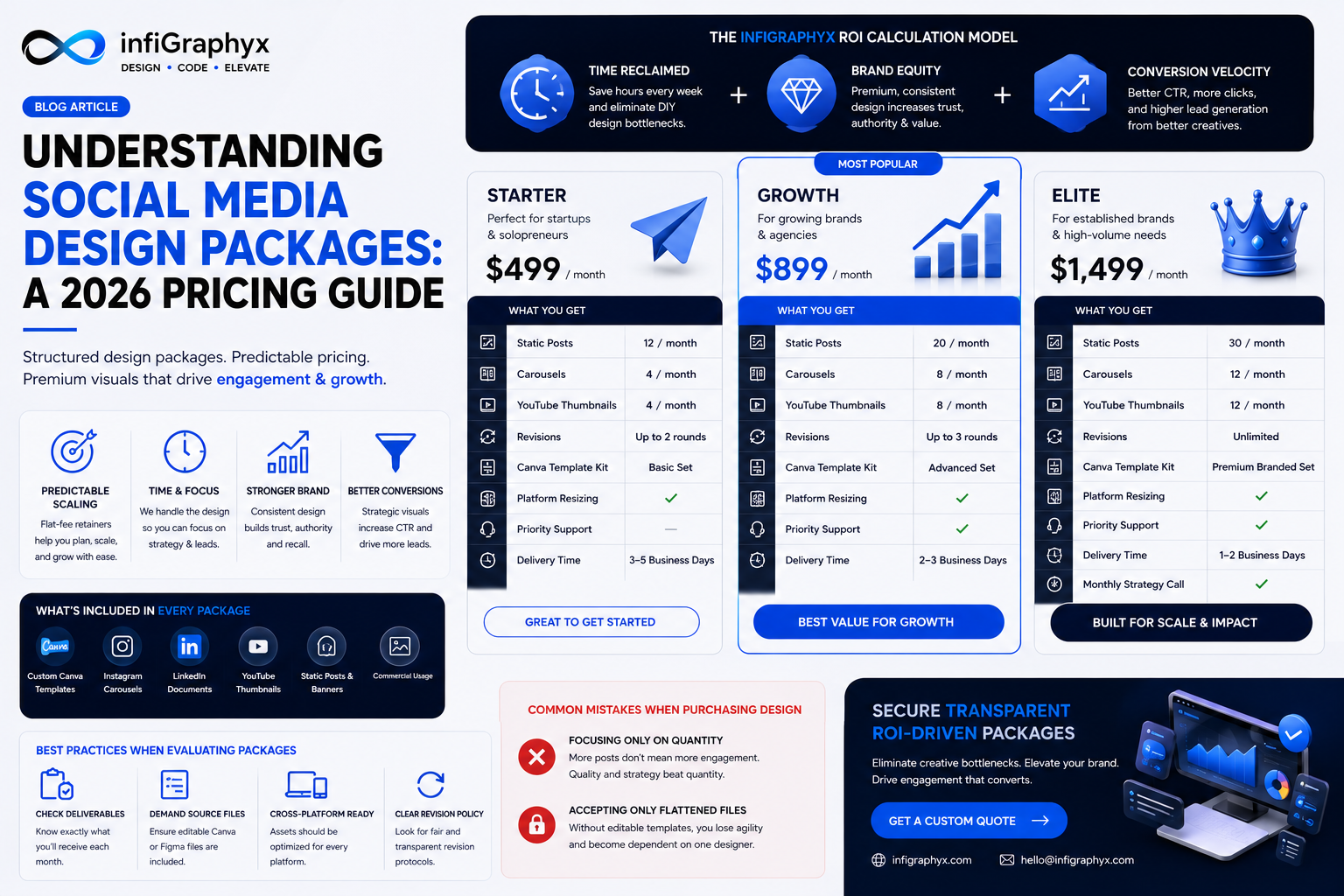
- Predictable Scaling: Typical social media design packages operate on a flat-fee tiered retainer model, eliminating the administrative friction of ad-hoc hourly billing.
- Strategic Deliverables: Premium packages provide value far beyond raw images; they deliver bespoke, editable Canva template design kits, strict visual identity governance, and platform-specific resizing.
- Efficiency and ROI: Monthly design retainers allow internal marketing teams to focus entirely on strategy and lead generation, while an agency handles high-volume visual execution.
What Are Social Media Design Packages?
Social media design packages are structured, productized service offerings that bundle various marketing creatives—such as Instagram carousels, YouTube thumbnails, and LinkedIn documents—into a single, predictable monthly or project-based fee. These packages are explicitly engineered to transition businesses away from chaotic DIY design and toward a highly scalable, professional visual identity system that drives audience engagement.
Why Are Structured Design Retainers Critical for Growth?
Ad-hoc project billing creates budgeting anxiety and inevitably leads to inconsistent branding as businesses scramble to find available freelancers. Monthly retainers guarantee a dedicated allocation of professional creative talent, ensuring strict long-term brand consistency. Businesses utilizing monthly design retainers consistently experience higher brand awareness, increased topical authority, and improved conversion rates due to their high-frequency, premium visual output.
The InfiGraphyx ROI Calculation Model
When evaluating design retainers, modern businesses must calculate the Return on Investment (ROI) using the proprietary InfiGraphyx ROI Calculation Model, observing three vectors:
- Time Reclaimed: Hours saved per week by internal staff not wrestling with layout design.
- Brand Equity: The measurable increase in customer trust and perceived value generated by a premium, cohesive feed.
- Conversion Velocity: The increase in Click-Through Rates (CTR) and lead generation form submissions driven by strategically designed CTA graphics.
Best Practices for Evaluating Design Tiers
Do not buy isolated graphics; invest in a scalable visual system. Ensure the package SLA clearly defines:
- Asset Volume: The exact total number of unique static posts, multi-slide carousels, or video thumbnails delivered per cycle.
- Source File Access: Does the agency provide natively editable Canva template links or Figma files for internal agility?
- Cross-Platform Formatting: Are assets natively optimized and resized for the nuances of Instagram Design versus LinkedIn Design?
- Revision Protocols: Are revisions capped, or does the agency guarantee satisfaction through unlimited revisions on standard layouts?
Expert Insight
Expert recommendations highlight that pure design packages generally require the client to provide the core copywriting. However, top-tier design agencies will actively assist in optimizing the copy for visual hierarchy (e.g., breaking long paragraphs into scannable bullet points for carousels).
Common Mistakes When Purchasing Design
- Focusing Only on Quantity: Procuring 30 low-quality, generic posts will generate less engagement than 8 highly strategic, conversion-optimized carousels. Quality drives algorithm reach; quantity without quality drives audience fatigue.
- Accepting Only Flattened Files: If you do not receive editable templates, you are permanently locked out of iterating on your own marketing creatives, stifling agility.
Secure Transparent, ROI-Driven Packages
Eliminate billing anxiety and creative bottlenecks. Professional design packages are structured for rapid deployment and absolute brand consistency. Contact InfiGraphyx to request a custom quotation tailored to your specific content marketing requirements.
infiGraphyx Team
The infiGraphyx team consists of talented designers and creative professionals passionate about helping brands succeed through stunning visual content.